
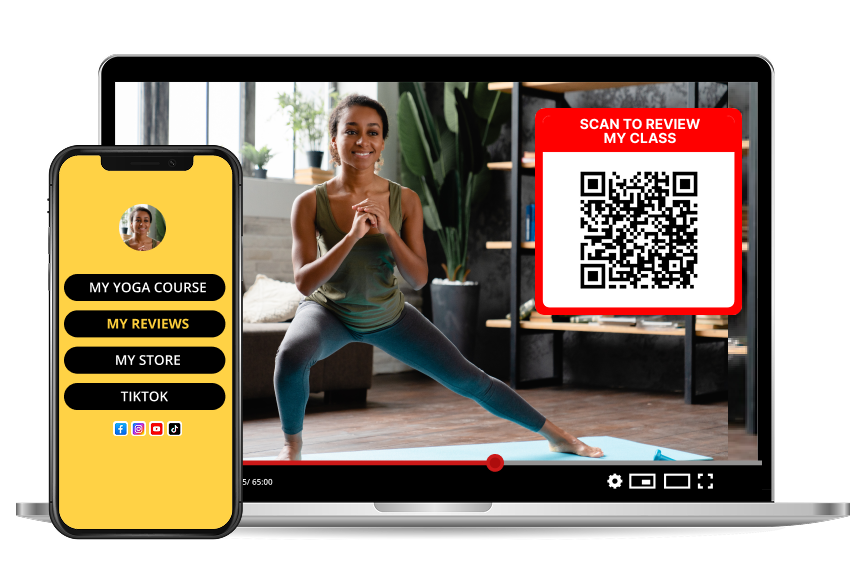
How to Set Up a QR Code Review Campaign for Your Channel
TL;DR
Create a review page, generate one QR code, show it in the last ten seconds of every video, and repeat the same ask everywhere else. Consistency beats clever.
Step 1: Build the page people land on
Before you print or display anything, set up the page the code points to. It needs your name or channel name, your logo, one line describing what you do, and your social links. When the page clearly matches the video someone just watched, they finish the review instead of bouncing.
Step 2: Generate one code, not five
Resist the urge to make a different code per video. One code, one page, one pool of reviews. That way you can read all your feedback together and spot patterns, and you never have to reprint anything.
Step 3: Choose your placements
Rank placements by attention, not by convenience:
Step 4: Write the ask
Two sentences maximum. Say what it is, how long it takes, and why it helps.
"Scan this to leave a quick review — 30 seconds, no app, and it decides what I make next."
Naming the benefit to them ("it decides what I make next") converts far better than "please review us".
Step 5: Ask one specific question
Generic prompts get generic answers. Rotate a specific question every month: which episode would you share, what nearly made you click away, what should I cover next.
Step 6: Reply in public
Every reply is an advertisement for leaving the next review. When people see the creator answering, they believe it is read.
How long before I see results?
Most creators see the first reviews within days of adding the code to an outro, and enough for patterns within a month of consistent placement.
Should the QR code be on screen the whole video?
No. It competes with your content. Put it up at the end, and keep the link in the description for anyone who wants it earlier.
What size should a QR code be on video?
Big enough to scan from a couch: aim for at least a fifth of the screen height, with clear space around it and a plain background behind it.
Keep going
Once the campaign runs, the reviews become your testimonial wall, your sponsor proof and your content calendar at the same time.