
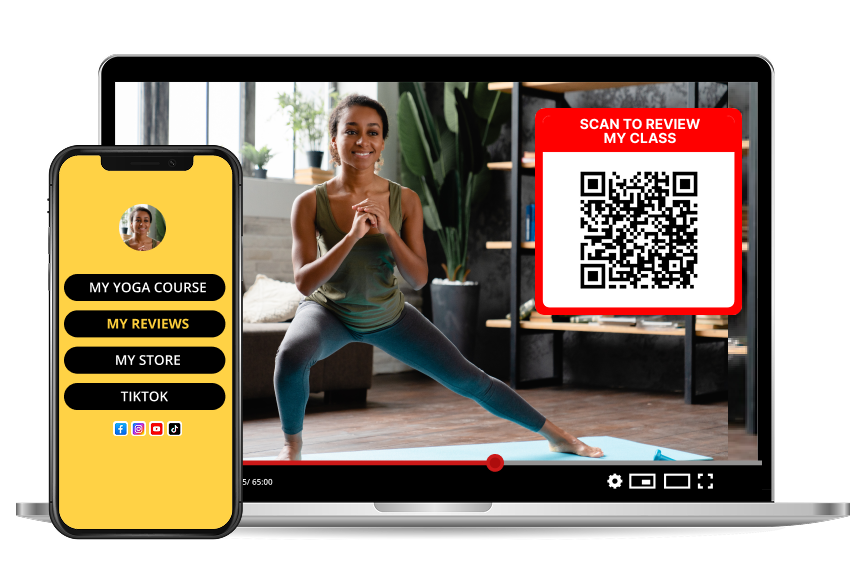
YouTube Channel Reviews with QR Codes: The Creator Growth Guide
TL;DR
YouTube creators grow subscribers and land sponsorships faster by hosting a dedicated channel review page and linking it via a QR code in every video outro. The review page collects star ratings, written testimonials, and audience insights that YouTube itself does not surface — making the channel legible to sponsors, agencies, and future collaborators.
What is a YouTube channel review page?
A YouTube channel review page is a public URL — separate from the channel's YouTube page — where viewers rate the channel from 1 to 5 stars and leave written feedback. It is the equivalent of a Google Business Profile for a creator, and it becomes the anchor asset for every sponsorship pitch, media kit, and collaboration request.
The 2025 Creator Deals Report by Passionfroot found that 74% of brand deals under $10,000 are decided in under 20 minutes, and the deciding factor is "the quality of third-party social proof the creator can hand over on request." A channel review page is that asset.
Why YouTube's native metrics are not enough
YouTube shows sponsors subscriber count, average views, and audience demographics. It does not show:
1. What real viewers say about the channel in their own words.
2. Aggregate star rating from the audience.
3. Response quality — how the creator handles feedback.
4. A URL the sponsor can inspect and reference in an internal deck.
A QR-linked review page fills every gap.
Step by step: launching a channel review page
1. Create a free channel page on Reviewtic — use the channel name, avatar, and one-line tagline.
2. Add links to your latest video, Patreon, merch store, and email newsletter.
3. Download the channel QR code as a transparent PNG.
4. Overlay the QR in the last 15 seconds of every video — bottom-right, 25% of frame.
5. Pin a comment with a text link for viewers who watch without volume.
6. Add the short URL to the video description, channel banner, and about section.
7. Approve reviews and reply — every reply is public and signals engagement.
8. Share the review page URL in every sponsor pitch and media kit.
What to ask viewers on the review page
Great channel reviews answer three questions:
1. What made you subscribe?
2. What is the one video you would recommend to a new viewer?
3. How would you describe this channel to a friend in one sentence?
The third question produces the quotable one-liner every sponsor deck needs.
Where to display the QR in your channel workflow
| Touchpoint | QR placement |
| ---------------------- | ------------------------------------------------ |
| Video outro | Bottom-right, last 15 seconds |
| Video description | Text link with short URL under first paragraph |
| Pinned comment | Short URL and one-line prompt |
| Channel banner | Small QR bottom-right corner |
| Community tab post | Full-width image, once every 2 weeks |
| Media kit PDF | Cover page and testimonial section |
| Sponsor pitch email | Text link, above the CTA |
| Podcast guest bio | Text link with vanity URL |
Sponsor pitch anatomy that closes deals
According to Creator Now's 2025 deal-flow analysis, sponsor pitches that include all three of the following close at 3.1× the rate of pitches missing any one:
1. View and demographic snapshot (YouTube Studio export).
2. Three quoted viewer testimonials with first names.
3. A live URL the sponsor can visit to see the full review page.
The QR-linked review page produces items 2 and 3 automatically.
Frequently asked questions
Will YouTube penalize me for showing a QR code?
No. YouTube's community guidelines do not prohibit QR codes or external links displayed on-screen. Millions of channels display QR codes for merch, Patreon, and events with no algorithmic penalty. The QR is treated as normal on-screen content.
How many reviews do I need before pitching sponsors?
Aim for at least 15 verified reviews with an average of 4.5 stars or higher before your first cold pitch. Below 15, sponsors interpret the review page as "just launched" and discount it. Above 15, the page reads as an established asset.
Can I use one QR for multiple channels?
If you run multiple channels, create a separate review page per channel. Sponsors evaluate channels individually, and a merged review page confuses the pitch.
What if I get a negative review?
Reply publicly, address the concern, and leave the review visible. Public research by Trustpilot shows that channels and businesses with a mix of 4- and 5-star reviews convert better than those with 100% 5-star ratings because mixed ratings read as authentic. A well-handled 3-star review is a trust signal, not a liability.
Is a review page a replacement for a media kit?
No. It is the anchor asset inside the media kit. Your media kit still needs your demographic data, past sponsor logos, and rate card — the review page is the third-party validation layer that ties it all together.