
YouTube Viewer Feedback with QR Codes: A Creator Playbook
TL;DR
YouTube creators use on-screen QR codes to collect structured viewer feedback outside the comment section. A QR code shown in the outro, pinned comment, or video description links to a dedicated review page where subscribers rate the channel, request topics, and leave testimonials that the creator can moderate and reuse in sponsorship pitches.
What is a YouTube feedback QR code?
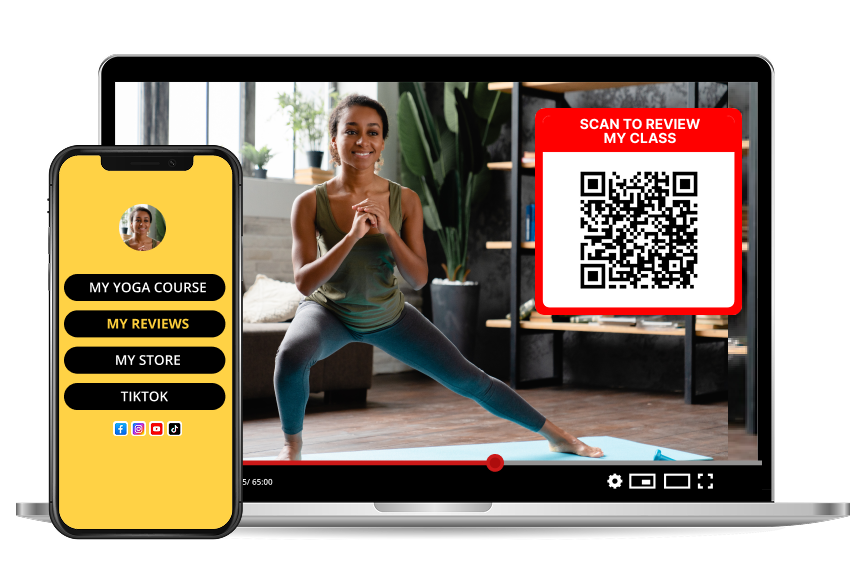
A YouTube feedback QR code is a scannable overlay — typically shown during the last 5 to 15 seconds of a video — that opens a mobile review page for the channel. Unlike YouTube comments, the feedback is owned by the creator, moderated before publishing, and portable across platforms.
Comments are locked to YouTube. A review page hosted on Reviewtic can be embedded on the creator's website, media kit, Patreon page, or sponsor deck.
Why the comment section is not enough
The YouTube comment section is designed for public conversation, not structured feedback. Three limits creators run into:
1. No star rating. YouTube removed video ratings in 2010; there is no quantitative signal beyond likes.
2. No moderation queue for testimonials. Sponsors want polished quotes, not threaded arguments.
3. No export. Comments cannot be repurposed as star-rated social proof on a landing page.
According to Tubefilter's 2025 creator economy report, 68% of full-time YouTubers pitch sponsors with a media kit — and every credible media kit needs verifiable star ratings and quotable testimonials. A QR-linked review page produces both.
Step by step: adding a feedback QR to your YouTube channel
1. Create a free channel page on Reviewtic and upload your channel logo, tagline, and links.
2. Download the QR code in a transparent PNG for overlay use.
3. Add the QR to your video outro card (Premiere Pro, Final Cut, DaVinci Resolve, or CapCut all support PNG overlays).
4. Pin a comment on every new upload: "Scan the QR at the end or tap here to leave a channel review."
5. Add the short URL to your video description and channel banner.
6. Approve the best testimonials and screenshot them for Shorts, thumbnails, and sponsor decks.
Where to display the QR on-screen
| Placement | Duration | Recommended size |
| ---------------------------- | --------- | -------------------------------- |
| Outro end-screen | 10-20 sec | 25% of frame, bottom-right |
| Video description link | Always | Text link + short URL |
| Pinned comment | Always | Text link |
| Channel banner | Always | Small QR bottom-right of banner |
| Community post | Weekly | Full-width image |
| Shorts end frame | 3-5 sec | Centered, 30% of frame |
How QR feedback improves sponsor deals
Sponsors buy audience quality, not just view counts. A creator who can hand a media buyer a URL with 50 verified 5-star reviews from real subscribers removes a category of objection. MediaKits.com reports that pitches including third-party testimonials close at roughly 2.3× the rate of pitches with view counts alone.
Frequently asked questions
Will a QR code on-screen hurt watch time or retention?
No. Retention curves published by TubeBuddy show that on-screen elements shown in the last 20 seconds of a video have no measurable effect on average view duration because retention drop-off in that window is already steep. The QR is displayed while viewers are already exiting.
Can viewers scan a QR from a phone screen?
Yes — modern iOS and Android cameras scan QR codes even from another phone screen or a TV set. YouTube's own 2024 mobile usage report shows 63% of YouTube watch time happens on mobile, so most viewers are watching on one device and can pick up a second to scan.
Is this different from a YouTube channel poll?
Yes. Polls are anonymous, ephemeral, and limited to four options. A QR review page collects star ratings, written testimonials, and (optionally) the reviewer's first name, all of which persist and can be reused as social proof.
Do I need a separate QR for each video?
No. One channel-level QR works for every upload. Creators who run multiple series sometimes generate a second QR for a specific playlist or product, but a single channel QR is enough to start.